
Deadside Aimbot Settings That Actually Make Sense
Aimbot menus can look intimidating. This guide explains each setting in plain terms so you can build a config that fits how you play.
An aimbot is not a single switch. In any decent product it is a group of settings that decide who you aim at, how fast you move there and when the assistance activates. Getting those right makes the difference between a smooth experience and something that looks obviously unnatural.
Deadside leans on ballistics and a wide range of weapons, so shot placement matters, especially at range. Here is what the common settings do.
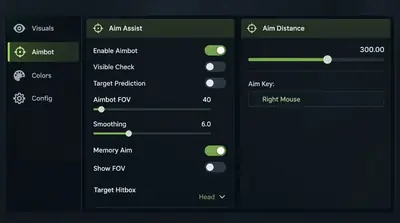
Field of view (FOV)
FOV is the circle around your crosshair in which the aimbot is allowed to pick a target. A small FOV means it only reacts to enemies close to where you are already aiming. A large FOV means it can grab targets far from your crosshair.
For most people, a modest FOV works better. It keeps the assistance feeling like a nudge, and it avoids pulling your aim toward the wrong target when several are visible.
Smoothing
Smoothing controls how quickly your aim moves toward the target. Low smoothing snaps almost instantly. Higher smoothing spreads the movement out so it looks more like a person tracking someone.
If you play on populated servers where other players can watch you, higher smoothing is the more cautious choice. A snap onto a head from across the screen is the kind of thing that gets people reported.
Target bone
This setting decides where the aim points: head, neck, chest or body. Head is the highest reward and also the least forgiving, since a moving target and bullet travel can make head shots fail more often than players expect. Chest is steadier and tends to land more consistently, especially at distance or during sprinting.
Some players pick chest for general use and switch to head for static targets.
Aim key
Most setups let you choose the key or button that activates the assistance. Holding a key means it only works when you want it to, which is far more controllable than leaving it on all the time. Pick something you can hit naturally without changing your grip.
Visibility check
A visibility check tells the aimbot to ignore targets you cannot actually see. This is useful in forests and buildings, where it stops the assist from locking onto someone behind a wall. It also avoids strange aim movement that other players might notice.
Recoil and spread options
Some products include recoil compensation. Automatic weapons climb noticeably in Deadside, and controlling that takes practice. Whether your build offers this option depends on the version, so check the feature list on the Deadside cheats page.
A sensible starting config
- Small to medium FOV.
- Moderate to high smoothing.
- Chest as the default bone.
- Aim key set to hold, not toggle.
- Visibility check on.
Test it on NPCs during a mission first. They are predictable, they do not report you, and you can see how the settings feel before taking them into a PvP situation.
Use it with other tools
Aim assistance works best alongside information. If you know where someone is before the fight starts, you can take the first shot on your terms. Our guide on setting up ESP in Deadside covers that side.
A note on risk
No setting makes software impossible to detect, and obvious behavior is still obvious to other players. Read how to judge risk and status before you play on an account you care about. For help getting the loader running, the store's setup guides are the place to start.